How to Use Object Pooling
Games that spawn lots of short-lived things — bullets, particles, explosions, enemies — all share the same problem. Every frame you're creating new objects and throwing old ones away. JavaScript handles this fine at small scale, but the pattern has a cost: every new or object literal allocates memory, and the garbage collector has to reclaim it eventually. At scale, that means unpredictable frame-time spikes when the GC decides to run.
Object pooling fixes this by flipping the approach. Instead of creating and destroying, we pre-allocate a fixed set of objects up front and recycle them. Need a particle? Grab an inactive one from the pool. Particle dies? Mark it inactive instead of deleting it. No allocation, no garbage, no surprises.
We're gonna build a particle fountain to learn the pattern — an emitter bouncing around the screen, spraying particles constantly. No game mechanics, no input, just lots of short-lived objects that need managing efficiently.
A Particle Fountain
Here's the naive version. An emitter bounces around the screen, and every frame we push a bunch of new particle objects into an array. Each particle has a position, velocity, lifetime, and color. When a particle's life hits zero, we filter it out:
engine.scope((scope) => {
    const { start, cls, circfill, text, rnd, randomIntegerBetween } = scope;

    let particles = [];
    let emitterX = 64;
    let emitterY = 64;
    let emitterVx = 1.5;
    let emitterVy = 1.2;

    function update() {
        emitterX += emitterVx;
        emitterY += emitterVy;
        if (emitterX < 0 || emitterX > 128) emitterVx *= -1;
        if (emitterY < 0 || emitterY > 128) emitterVy *= -1;

        for (let i = 0; i < 80; i++) {
            particles.push({
                x: emitterX,
                y: emitterY,
                vx: (rnd(200) - 100) / 100,
                vy: (rnd(200) - 100) / 100,
                life: 60 + rnd(90),
                color: randomIntegerBetween(8, 14),
            });
        }

        for (let i = 0; i < particles.length; i++) {
            particles[i].x += particles[i].vx;
            particles[i].y += particles[i].vy;
            particles[i].life--;
        }

        particles = particles.filter((p) => p.life > 0);
    }

    function draw() {
        cls(0);
        for (let i = 0; i < particles.length; i++) {
            circfill(particles[i].x, particles[i].y, 1, particles[i].color);
        }
        text('FPS: ' + scope.currentFps, 2, 2, 7);
        text('PARTICLES: ' + particles.length, 2, 10, 7);
    }

    start({ sprites: {}, sounds: {}, update, draw, target });
});
This works. The particles look good and the code is clean. But there are three things happening every frame that add up at scale.
Where the Time Goes
Three costs compound in the naive approach:
Allocation. Every frame creates 80 new object literals. Each one needs memory from the runtime. At 60 FPS that's 4,800 objects per second — each with six properties to set up.
Filtering. particles.filter(p => p.life > 0) builds a brand-new array every frame. If there are 5,000 active particles, filter walks all 5,000, copies the survivors into a fresh array, and the old one becomes garbage. A full copy, every frame.
Garbage collection. All those dead particles and discarded arrays pile up. JavaScript's garbage collector reclaims them eventually, but it runs on its own schedule. When it kicks in, it can pause execution for a few milliseconds — long enough to stutter a frame. You won't see a steady FPS drop. You'll see periodic hitches that feel like lag.
At particle-fountain scale this probably doesn't matter much. But a survivors-like game with hundreds of bullets, enemies, damage numbers, and particle effects? Every one of those objects follows the same create-use-destroy cycle. The GC pressure compounds across all of them, and the hitches get worse.
Pre-allocating with a Pool
The fix is to allocate all the objects once, up front, and reuse them. Here's the data structure — a flat array where every entry has an active flag:
const MAX_PARTICLES = 8000;
let pool = [];
for (let i = 0; i < MAX_PARTICLES; i++) {
    pool.push({
        active: false,
        x: 0,
        y: 0,
        vx: 0,
        vy: 0,
        life: 0,
        color: 0,
    });
}
All 8,000 particles exist from the start. None of them are active — they're just sitting in memory waiting to be used.
To spawn a particle, we scan for the first inactive entry and mark it active:
let activeCount = 0;

function acquire() {
    for (let i = 0; i < pool.length; i++) {
        if (!pool[i].active) {
            pool[i].active = true;
            activeCount++;
            return pool[i];
        }
    }
    return null;
}
acquire returns a reference to the object. We set its properties — position, velocity, life, color — and it's ready to go. If the pool is full it returns null and we skip that spawn. No allocation happened.
When a particle dies, we release it back:
function release(p) {
    p.active = false;
    activeCount--;
}
That's it. active = false makes the slot available for the next acquire call. No deletion, no garbage, no new array.
The iteration pattern changes too. Instead of filtering, we loop the whole pool and skip inactive entries:
for (let i = 0; i < pool.length; i++) {
    if (!pool[i].active) continue;
    // update this particle...
}
This walks more entries than the naive array (the pool includes inactive slots), but it never allocates or copies anything. The tradeoff is worth it — a predictable loop over pre-allocated memory beats unpredictable GC pauses every time.
Recycling Particles
Let's apply the pool to our particle fountain. Same visual, same emitter, same particle count — but no push, no filter, no new:
engine.scope((scope) => {
    const { start, cls, circfill, text, rnd, randomIntegerBetween } = scope;

    const MAX_PARTICLES = 8000;
    let pool = [];
    for (let i = 0; i < MAX_PARTICLES; i++) {
        pool.push({
            active: false,
            x: 0,
            y: 0,
            vx: 0,
            vy: 0,
            life: 0,
            color: 0,
        });
    }

    let activeCount = 0;
    let emitterX = 64;
    let emitterY = 64;
    let emitterVx = 1.5;
    let emitterVy = 1.2;

    function acquire() {
        for (let i = 0; i < pool.length; i++) {
            if (!pool[i].active) {
                pool[i].active = true;
                activeCount++;
                return pool[i];
            }
        }
        return null;
    }

    function release(p) {
        p.active = false;
        activeCount--;
    }

    function update() {
        emitterX += emitterVx;
        emitterY += emitterVy;
        if (emitterX < 0 || emitterX > 128) emitterVx *= -1;
        if (emitterY < 0 || emitterY > 128) emitterVy *= -1;

        for (let i = 0; i < 80; i++) {
            let p = acquire();
            if (!p) break;
            p.x = emitterX;
            p.y = emitterY;
            p.vx = (rnd(200) - 100) / 100;
            p.vy = (rnd(200) - 100) / 100;
            p.life = 60 + rnd(90);
            p.color = randomIntegerBetween(8, 14);
        }

        for (let i = 0; i < pool.length; i++) {
            if (!pool[i].active) continue;
            pool[i].x += pool[i].vx;
            pool[i].y += pool[i].vy;
            pool[i].life--;
            if (pool[i].life <= 0) release(pool[i]);
        }
    }

    function draw() {
        cls(0);
        for (let i = 0; i < pool.length; i++) {
            if (!pool[i].active) continue;
            circfill(pool[i].x, pool[i].y, 1, pool[i].color);
        }
        text('FPS: ' + scope.currentFps, 2, 2, 7);
        text('PARTICLES: ' + activeCount, 2, 10, 7);
    }

    start({ sprites: {}, sounds: {}, update, draw, target });
});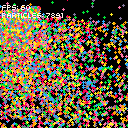
The spawning loop calls acquire() instead of pushing a new object. If the pool is exhausted it breaks out — no crash, just fewer particles that frame. The update loop walks the entire pool, skips inactive entries, and calls release() instead of relying on filter().
After the initial allocation, this code creates zero new objects. The particle count stays high, the FPS stays smooth, and the garbage collector has nothing to do.
Complete Example
Here's the polished version. The fountain still runs, but now we can click anywhere to spawn a burst of 200 particles at the cursor. The fountain cycles through colors, and the active count is displayed alongside the FPS:
engine.scope((scope) => {
    const { start, cls, circfill, text, rnd, randomIntegerBetween, click, mouse } = scope;

    const MAX_PARTICLES = 10000;
    const COLORS = [8, 9, 10, 11, 12, 13, 14];
    let pool = [];
    for (let i = 0; i < MAX_PARTICLES; i++) {
        pool.push({
            active: false,
            x: 0,
            y: 0,
            vx: 0,
            vy: 0,
            life: 0,
            color: 0,
        });
    }

    let activeCount = 0;
    let emitterX = 64;
    let emitterY = 64;
    let emitterVx = 1.5;
    let emitterVy = 1.2;
    let colorIndex = 0;

    function acquire() {
        for (let i = 0; i < pool.length; i++) {
            if (!pool[i].active) {
                pool[i].active = true;
                activeCount++;
                return pool[i];
            }
        }
        return null;
    }

    function release(p) {
        p.active = false;
        activeCount--;
    }

    function spawnBurst(x, y, count) {
        for (let i = 0; i < count; i++) {
            let p = acquire();
            if (!p) break;
            p.x = x;
            p.y = y;
            let angle = (rnd(360) * Math.PI) / 180;
            let speed = 0.5 + rnd(200) / 100;
            p.vx = Math.cos(angle) * speed;
            p.vy = Math.sin(angle) * speed;
            p.life = 20 + rnd(40);
            p.color = COLORS[randomIntegerBetween(0, COLORS.length - 1)];
        }
    }

    function update() {
        emitterX += emitterVx;
        emitterY += emitterVy;
        if (emitterX < 0 || emitterX > 128) emitterVx *= -1;
        if (emitterY < 0 || emitterY > 128) emitterVy *= -1;

        colorIndex = (colorIndex + 1) % COLORS.length;
        for (let i = 0; i < 80; i++) {
            let p = acquire();
            if (!p) break;
            p.x = emitterX;
            p.y = emitterY;
            p.vx = (rnd(200) - 100) / 100;
            p.vy = (rnd(200) - 100) / 100;
            p.life = 60 + rnd(90);
            p.color = COLORS[(colorIndex + i) % COLORS.length];
        }

        if (click()) {
            let m = mouse();
            spawnBurst(m.x, m.y, 200);
        }

        for (let i = 0; i < pool.length; i++) {
            if (!pool[i].active) continue;
            pool[i].x += pool[i].vx;
            pool[i].y += pool[i].vy;
            pool[i].life--;
            if (pool[i].life <= 0) release(pool[i]);
        }
    }

    function draw() {
        cls(0);
        for (let i = 0; i < pool.length; i++) {
            if (!pool[i].active) continue;
            circfill(pool[i].x, pool[i].y, 1, pool[i].color);
        }
        text('FPS: ' + scope.currentFps, 2, 2, 7);
        text('PARTICLES: ' + activeCount, 2, 10, 7);
    }

    start({ sprites: {}, sounds: {}, update, draw, target });
});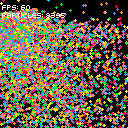
spawnBurst uses the same acquire/release pattern as the fountain. It picks a random angle and speed for each particle so they fly outward in a circle. The pool handles both the fountain and the bursts — when we click, 200 particles get acquired from the same pool. If the pool runs low, the burst just spawns fewer. No crash, no special handling.
Going Further
- Reusable Pool class — wrap
acquire,release, and the iteration loop into a class so you can create pools for different object types without repeating the pattern - Auto-growing pools — when
acquirefinds no inactive entries, push a new object instead of returningnull. You lose the fixed-size guarantee but never drop spawns - Multiple pools — separate pools for bullets, particles, enemies, and damage numbers, each sized for its object type's expected peak count
- Warm-up frame — pre-activate and immediately release a batch of objects on the first frame to avoid any first-use allocation cost from the runtime
- Free list — instead of scanning the whole pool for an inactive entry, maintain a stack of free indices.
acquirepops an index,releasepushes it back. O(1) instead of O(n)