How to Build a Top-Down Adventure
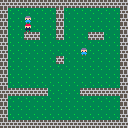
Top-down adventures are one of the most recognizable retro genres. The engine doesn't have built-in tile collision, NPCs, or dialogue — we're building all of that from scratch with a tilemap, some sprite flags, and a state machine. By the end, we'll have a scrolling world with rooms, walls, NPCs to talk to, and a dialogue box.
Drawing the World
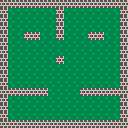
Every top-down game starts with a world. We need two tile types — floor and wall — and the tilemap system to arrange them into rooms.
Each sprite definition includes a flags array. Setting flag 0 to true marks a tile as solid. We'll use this convention for collision later.
The floor sprite is dark green (3) with a couple of bright green (11) accent pixels for texture. The wall is dark grey (5) with light grey (6) mortar lines in a brick pattern. buildWorld fills a 16×16 grid with floor, places walls around the perimeter, and adds interior walls to carve out corridors:
engine.scope(({ start, cls, mset, map }) => {
    const sprites = {
        floor: [
            [
                3, 3, 3, 3, 3, 3, 3, 3,
                3, 3, 3, 3, 3, 3, 3, 3,
                3, 3, 11, 3, 3, 3, 3, 3,
                3, 3, 3, 3, 3, 3, 3, 3,
                3, 3, 3, 3, 3, 3, 3, 3,
                3, 3, 3, 3, 3, 11, 3, 3,
                3, 3, 3, 3, 3, 3, 3, 3,
                3, 3, 3, 3, 3, 3, 3, 3,
            ],
            [false, false, false, false, false, false, false, false],
        ],
        wall: [
            [
                5, 5, 5, 6, 5, 5, 5, 6,
                5, 5, 5, 6, 5, 5, 5, 6,
                6, 6, 6, 6, 6, 6, 6, 6,
                5, 6, 5, 5, 5, 6, 5, 5,
                5, 6, 5, 5, 5, 6, 5, 5,
                6, 6, 6, 6, 6, 6, 6, 6,
                5, 5, 5, 6, 5, 5, 5, 6,
                5, 5, 5, 6, 5, 5, 5, 6,
            ],
            [true, false, false, false, false, false, false, false],
        ],
    };

    function buildWorld() {
        for (let y = 0; y < 16; y++) {
            for (let x = 0; x < 16; x++) {
                mset(x, y, 'floor');
            }
        }

        for (let i = 0; i < 16; i++) {
            mset(i, 0, 'wall');
            mset(i, 15, 'wall');
            mset(0, i, 'wall');
            mset(15, i, 'wall');
        }

        for (let y = 1; y <= 7; y++) {
            if (y === 5 || y === 6) continue;
            mset(7, y, 'wall');
        }

        for (let x = 1; x <= 14; x++) {
            if (x >= 6 && x <= 9) continue;
            mset(x, 11, 'wall');
        }

        mset(3, 4, 'wall');
        mset(4, 4, 'wall');
        mset(11, 4, 'wall');
        mset(12, 4, 'wall');
    }

    function init() {
        buildWorld();
    }

    function draw() {
        cls(0);
        map(0);
    }

    start({ sprites, sounds: {}, init, draw, target });
});
Flag 0 is just a convention — the engine doesn't assign meaning to any particular flag. We're choosing flag 0 for "solid" because it's the first one and easy to remember.
Moving the Player
Now we need a character. We'll define four directional sprites so the player faces whichever way they're moving — red (8) hat, peach (15) skin, dark blue (1) body, brown (4) boots.
Movement is grid-aligned. The player moves tile-to-tile in 8-pixel steps but lerps smoothly between positions each frame so it doesn't look like teleporting. tileX/tileY track the logical grid position, px/py track the pixel position on screen. Each frame, px and py move toward tileX * 8 and tileY * 8. When they arrive, we read input for the next direction.
Input is read every frame — not just when the player finishes a step. Horizontal and vertical are checked separately so you can switch axes without letting go of the current key. lastAxis tracks which direction was pressed alone most recently, and the newer axis wins:
engine.scope(({ start, cls, spr, btn, mset, map }) => {
    const sprites = {
        floor: [
            [
                3, 3, 3, 3, 3, 3, 3, 3,
                3, 3, 3, 3, 3, 3, 3, 3,
                3, 3, 11, 3, 3, 3, 3, 3,
                3, 3, 3, 3, 3, 3, 3, 3,
                3, 3, 3, 3, 3, 3, 3, 3,
                3, 3, 3, 3, 3, 11, 3, 3,
                3, 3, 3, 3, 3, 3, 3, 3,
                3, 3, 3, 3, 3, 3, 3, 3,
            ],
            [false, false, false, false, false, false, false, false],
        ],
        wall: [
            [
                5, 5, 5, 6, 5, 5, 5, 6,
                5, 5, 5, 6, 5, 5, 5, 6,
                6, 6, 6, 6, 6, 6, 6, 6,
                5, 6, 5, 5, 5, 6, 5, 5,
                5, 6, 5, 5, 5, 6, 5, 5,
                6, 6, 6, 6, 6, 6, 6, 6,
                5, 5, 5, 6, 5, 5, 5, 6,
                5, 5, 5, 6, 5, 5, 5, 6,
            ],
            [true, false, false, false, false, false, false, false],
        ],
        playerDown: [
            [
                -1, -1,  8,  8,  8,  8, -1, -1,
                -1,  8,  8,  8,  8,  8,  8, -1,
                -1, 15, 15, 15, 15, 15, 15, -1,
                -1, 15,  1, 15, 15,  1, 15, -1,
                -1, -1,  1,  1,  1,  1, -1, -1,
                -1,  1,  1,  1,  1,  1,  1, -1,
                -1, -1,  1, -1, -1,  1, -1, -1,
                -1, -1,  4, -1, -1,  4, -1, -1,
            ],
            [false, false, false, false, false, false, false, false],
        ],
        playerUp: [
            [
                -1, -1,  8,  8,  8,  8, -1, -1,
                -1,  8,  8,  8,  8,  8,  8, -1,
                -1,  8,  8,  8,  8,  8,  8, -1,
                -1,  8,  8,  8,  8,  8,  8, -1,
                -1, -1,  1,  1,  1,  1, -1, -1,
                -1,  1,  1,  1,  1,  1,  1, -1,
                -1, -1,  1, -1, -1,  1, -1, -1,
                -1, -1,  4, -1, -1,  4, -1, -1,
            ],
            [false, false, false, false, false, false, false, false],
        ],
        playerLeft: [
            [
                -1, -1,  8,  8,  8, -1, -1, -1,
                -1,  8,  8,  8,  8,  8, -1, -1,
                -1, 15, 15, 15, 15, -1, -1, -1,
                 1, 15, 15, 15, -1, -1, -1, -1,
                -1, -1,  1,  1,  1, -1, -1, -1,
                -1,  1,  1,  1,  1, -1, -1, -1,
                -1, -1,  1, -1,  1, -1, -1, -1,
                -1, -1,  4, -1,  4, -1, -1, -1,
            ],
            [false, false, false, false, false, false, false, false],
        ],
        playerRight: [
            [
                -1, -1, -1,  8,  8,  8, -1, -1,
                -1, -1,  8,  8,  8,  8,  8, -1,
                -1, -1, -1, 15, 15, 15, 15, -1,
                -1, -1, -1, -1, 15, 15, 15,  1,
                -1, -1, -1,  1,  1,  1, -1, -1,
                -1, -1,  1,  1,  1,  1, -1, -1,
                -1, -1,  1, -1,  1, -1, -1, -1,
                -1, -1,  4, -1,  4, -1, -1, -1,
            ],
            [false, false, false, false, false, false, false, false],
        ],
    };

    let tileX = 3, tileY = 3;
    let px, py;
    let moving = false;
    let facing = 'down';
    let lastAxis = 'h';
    const speed = 2;

    const facingSprite = {
        down: 'playerDown',
        up: 'playerUp',
        left: 'playerLeft',
        right: 'playerRight',
    };

    function buildWorld() {
        for (let y = 0; y < 16; y++) {
            for (let x = 0; x < 16; x++) {
                mset(x, y, 'floor');
            }
        }

        for (let i = 0; i < 16; i++) {
            mset(i, 0, 'wall');
            mset(i, 15, 'wall');
            mset(0, i, 'wall');
            mset(15, i, 'wall');
        }

        for (let y = 1; y <= 7; y++) {
            if (y === 5 || y === 6) continue;
            mset(7, y, 'wall');
        }

        for (let x = 1; x <= 14; x++) {
            if (x >= 6 && x <= 9) continue;
            mset(x, 11, 'wall');
        }

        mset(3, 4, 'wall');
        mset(4, 4, 'wall');
        mset(11, 4, 'wall');
        mset(12, 4, 'wall');
    }

    function init() {
        buildWorld();
        px = tileX * 8;
        py = tileY * 8;
    }

    function update() {
        let dx = 0, dy = 0;
        if (btn('ArrowLeft') || btn('a')) dx = -1;
        else if (btn('ArrowRight') || btn('d')) dx = 1;
        if (btn('ArrowUp') || btn('w')) dy = -1;
        else if (btn('ArrowDown') || btn('s')) dy = 1;

        if (dx !== 0 && dy === 0) lastAxis = 'h';
        if (dy !== 0 && dx === 0) lastAxis = 'v';
        if (dx !== 0 && dy !== 0) {
            if (lastAxis === 'h') dx = 0;
            else dy = 0;
        }

        if (dx === -1) facing = 'left';
        else if (dx === 1) facing = 'right';
        else if (dy === -1) facing = 'up';
        else if (dy === 1) facing = 'down';

        if (!moving && (dx !== 0 || dy !== 0)) {
            tileX += dx;
            tileY += dy;
            moving = true;
        }

        if (moving) {
            const tx = tileX * 8;
            const ty = tileY * 8;

            if (px < tx) px = Math.min(px + speed, tx);
            else if (px > tx) px = Math.max(px - speed, tx);

            if (py < ty) py = Math.min(py + speed, ty);
            else if (py > ty) py = Math.max(py - speed, ty);

            if (px === tx && py === ty) moving = false;
        }
    }

    function draw() {
        cls(0);
        map(0);
        spr(facingSprite[facing], px, py);
    }

    start({ sprites, sounds: {}, init, update, draw, target });
});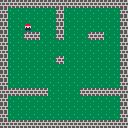
Notice the player walks straight through walls right now. Grid-aligned movement doesn't automatically respect tile flags — that's next.
Wall Collisions
The player walks through walls because nothing checks whether the destination tile is solid. We need an isSolid function that reads the tile at a grid position with mget and checks flag 0 with fget:
function isSolid(x, y) {
    const tile = mget(x, y);
    return tile && fget(tile, 0);
}
Before updating tileX/tileY, we test the destination. Solid? Skip the move. The player still turns to face that direction — they just don't step forward:
if (!moving && (dx !== 0 || dy !== 0)) {
    const nx = tileX + dx;
    const ny = tileY + dy;

    if (!isSolid(nx, ny)) {
        tileX = nx;
        tileY = ny;
        moving = true;
    }
}
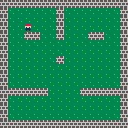
One function and one if check. Grid-aligned movement makes collision trivial — one tile to check per move, no corner cases or sub-pixel math.
Adding NPCs
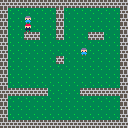
A world without characters is just architecture. NPCs are plain objects — a tile position, a sprite, a name, and some dialogue lines:
const npcs = [
    { tileX: 3, tileY: 2, sprite: 'npc', name: 'Old Man',
      lines: ['Welcome, traveler!', 'Explore this place.', 'Watch out for walls.'] },
    { tileX: 10, tileY: 6, sprite: 'npc', name: 'Guard',
      lines: ['The south room', 'is mostly empty.', 'Nothing to see...'] },
];
The NPC sprite uses lavender (13) for hair and blue (12) for the body — distinct enough from the red-hatted player to tell them apart at a glance.
NPCs block movement the same way walls do. We rename isSolid to isBlocked and add an NPC position check:
function isBlocked(x, y) {
    const tile = mget(x, y);
    if (tile && fget(tile, 0)) return true;
    return npcs.some(n => n.tileX === x && n.tileY === y);
}
To figure out when the player is next to an NPC, we check the tile they're facing. A direction lookup maps each facing string to a grid offset:
const dir = { left: [-1, 0], right: [1, 0], up: [0, -1], down: [0, 1] };

const [fdx, fdy] = dir[facing];
const fx = tileX + fdx;
const fy = tileY + fdy;
nearNpc = npcs.find(n => n.tileX === fx && n.tileY === fy) || null;
When nearNpc is set and the player isn't mid-step, a "Z to talk" prompt shows up at the bottom of the screen.
Dialogue System
The talk prompt works, but pressing Z doesn't do anything yet. We need a state machine — two modes: 'explore' for normal movement, 'dialogue' for reading NPC text.
When the player presses Z near an NPC, we switch to dialogue mode, store which NPC is speaking, and start at line 0:
let mode = 'explore';
let dialogNpc = null;
let dialogLine = 0;

// in update, before movement:
if (nearNpc && (btnp('z') || btnp(' '))) {
    mode = 'dialogue';
    dialogNpc = nearNpc;
    dialogLine = 0;
    return;
}
In dialogue mode, movement is ignored. Z advances to the next line. After the last line, we're back to exploring:
if (mode === 'dialogue') {
    if (btnp('z') || btnp(' ')) {
        dialogLine++;
        if (dialogLine >= dialogNpc.lines.length) {
            mode = 'explore';
            dialogNpc = null;
            dialogLine = 0;
        }
    }
    return;
}
The dialogue draws the NPC's name in yellow, the current line in white, and a "Z..." prompt so you know to keep pressing:
if (mode === 'dialogue' && dialogNpc) {
    text(dialogNpc.name, 4, 88, 10);
    text(dialogNpc.lines[dialogLine], 4, 100, 7);
    text('Z...', 108, 112, 6);
}
btnp (button pressed) returns true only on the first frame a key is held. This prevents a single press from blowing through multiple dialogue lines at once.
A Bigger World
So far the world fits exactly on screen — 16×16 tiles at 8 pixels each fills the 128×128 canvas. Real adventure games have worlds bigger than the viewport. Let's expand to 32×24 tiles and add camera scrolling.
The camera centers on the player and clamps to the world bounds so it never shows empty space past the edges:
const MAP_W = 32, MAP_H = 24;
const CANVAS = 128;

camX = Math.max(0, Math.min(MAP_W * 8 - CANVAS, px - 60));
camY = Math.max(0, Math.min(MAP_H * 8 - CANVAS, py - 60));
We call camera(camX, camY) before rendering. map only draws a screenful of tiles by default, so we figure out which cell the camera starts at and pass that as the origin — 17 columns and rows from the visible cell, positioned at the right world coordinates. UI stuff like dialogue needs to stay fixed on screen, so we call creset() before drawing it:
function draw() {
    cls(0);
    camera(camX, camY);
    const cx = Math.floor(camX / 8);
    const cy = Math.floor(camY / 8);
    map(0, cx, cy, 17, 17, cx * 8, cy * 8);

    for (const n of npcs) {
        spr(n.sprite, n.tileX * 8, n.tileY * 8);
    }

    spr(facingSprite[facing], px, py);

    creset();

    if (mode === 'dialogue' && dialogNpc) {
        text(dialogNpc.name, 4, 88, 10);
        text(dialogNpc.lines[dialogLine], 4, 100, 7);
        text('Z...', 108, 112, 6);
    } else if (nearNpc && !moving) {
        text('Z to talk', 38, 112, 7);
    }
}
The bigger world has two wings connected by a corridor, rooms in the south half, and three NPCs spread around. Explore and you'll see the camera track wherever you go.
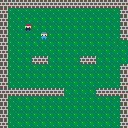
creset() resets the camera offset to (0, 0). Anything drawn after it renders in screen space — perfect for HUD elements, dialogue boxes, and score displays.
Going Further
- Animated sprites — cycle between 2-3 walk frame sprites using
Math.floor(frame / 8) % frameCountwhile the player is moving - Item pickups — place collectible sprites on certain tiles, remove them from an items array when the player walks over them, track inventory in a separate list
- Locked doors — mark certain wall tiles with flag 1 as doors, only allow passage when the player has the matching key item in their inventory
- Multiple maps — store several tile grids as arrays and swap them when the player steps on an exit tile, resetting the tilemap with
mclearand rebuilding from the new grid - NPC movement — give each NPC a patrol path as an array of tile coordinates and move them one step on a timer, pausing movement while in dialogue
- Sound effects — use
sfx()to play a footstep sound on each tile transition, a chime when opening dialogue, and a pickup sound for items