How to Add Fog & Lighting
The raycasting tutorial's distance shading is crude — three hard brightness levels that snap walls between light, dim, and dark. There's no gradation, no atmosphere. We're going to fix that.
When we're done, we'll have smooth dithered fog fading walls into darkness, a player-carried torch that cuts a cone of light through the haze, and street lamps casting pools of light around the map. Each effect builds on the previous one, so you can stop at any point and have something that works.
The Starting Point
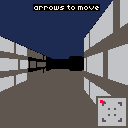
Here's the raycaster from the previous tutorial. It uses a darken lookup table to shade walls at two fixed distance thresholds — perpDist >= 4 darkens once, perpDist >= 8 darkens twice. Walk around and notice how walls snap between brightness levels with no transition.
const darken = [
    0, 0, 0, 0, 2, 0, 5, 6,
    2, 4, 9, 3, 1, 1, 2, 9,
];

// inside the wall rendering loop:
if (perpDist >= 8) {
    color = darken[darken[color]];
} else if (perpDist >= 4) {
    color = darken[color];
}
Each entry maps a color index to its darker variant. Applying it twice gives the darkest level. The problem? Walls pop between three flat brightness bands. There's nothing in between.
Dithered Distance Fog
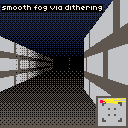
We only have 16 colors and a darken table, so true gradient shading isn't an option. But we can fake it with ordered dithering — some pixels darken before others based on their screen position, and the pattern reads as a smooth gradient from a distance.
The trick is a 4x4 Bayer matrix — a grid of threshold values that determines which pixels darken first:
const bayer = [
    0 / 16, 8 / 16, 2 / 16, 10 / 16,
    12 / 16, 4 / 16, 14 / 16, 6 / 16,
    3 / 16, 11 / 16, 1 / 16, 9 / 16,
    15 / 16, 7 / 16, 13 / 16, 5 / 16,
];
Each value is normalized to 0–1. The matrix tiles across the screen — every pixel looks up its threshold at (y % 4) * 4 + (x % 4). When the fog factor exceeds that threshold, we darken the pixel. Different pixels have different thresholds, so they darken at different distances. The result looks like a smooth gradient.
We need a continuous fog factor instead of the old hard cutoffs. fogAmount returns 0 for anything closer than FOG_START (so nearby walls stay crisp) and ramps to 1 at MAX_DIST:
const FOG_START = 3;
const MAX_DIST = 6;

function fogAmount(dist) {
    if (dist <= FOG_START) return 0;
    return Math.min(1, (dist - FOG_START) / (MAX_DIST - FOG_START));
}
applyFog compares the fog factor against the Bayer threshold for that pixel. If the fog is strong enough, darken once. If it's really strong (threshold + 0.5), darken twice for full blackout:
function applyFog(color, fogFactor, sx, sy) {
    const threshold = bayer[(sy % 4) * 4 + (sx % 4)];
    if (fogFactor > threshold + 0.5) {
        return darken[darken[color]];
    } else if (fogFactor > threshold) {
        return darken[color];
    }
    return color;
}
For walls, we compute fogAmount(perpDist) once per column and pass it to applyFog for each pixel in the stripe.
The ceiling and floor need fog too. We can't use rectfill anymore because each pixel needs its own dither check. Instead, we draw them pixel by pixel — fog increases toward the horizon (where distance is conceptually infinite) and decreases toward the top and bottom of the screen:
const halfH = viewH / 2;

for (let sy = 0; sy < viewH; sy++) {
    const distFromHorizon = Math.abs(sy - halfH);
    const floorFog = 1 - distFromHorizon / halfH;
    const baseColor = sy < halfH ? 1 : 5;
    for (let sx = 0; sx < viewW; sx++) {
        pset(sx, sy, applyFog(baseColor, floorFog, sx, sy));
    }
}
Player Torch
The fog is atmospheric, but it's relentless — everything past FOG_START darkens, including walls right in front of us. Let's give the player a torch.
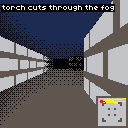
Here's the trick: the torch doesn't add brightness. It reduces the effective distance used for the fog calculation. Columns near the center of the viewport get a larger reduction, creating a cone shape. The falloff is parabolic — strongest dead ahead, dropping off toward the edges:
const TORCH_STRENGTH = 4;

// per column:
const columnOffset = Math.abs(x - viewW / 2) / (viewW / 2);
const torchReduction = TORCH_STRENGTH * (1 - columnOffset * columnOffset);
const effectiveDist = Math.max(0, perpDist - torchReduction);
const fogFactor = fogAmount(effectiveDist);
columnOffset is 0 at the center of the screen and 1 at the edges. Squaring it gives the parabolic curve — the light drops off gently near the middle and sharply at the sides. TORCH_STRENGTH controls how many distance units the torch "pushes back" the fog at the center.
We feed effectiveDist into fogAmount instead of the raw perpDist. A wall 5 units away dead center gets treated as 1 unit away (5 - 4 = 1) — below FOG_START, so it renders fully lit. The same wall at the screen edge gets no reduction and fogs normally.
The ceiling and floor need the same treatment — for each pixel, compute the torch reduction based on its horizontal position and subtract it from the floor fog:
for (let sx = 0; sx < viewW; sx++) {
    const columnOffset = Math.abs(sx - viewW / 2) / (viewW / 2);
    const torchReduction = TORCH_STRENGTH * (1 - columnOffset * columnOffset);
    const effectiveFog = Math.max(0, floorFog - torchReduction / MAX_DIST);
    pset(sx, sy, applyFog(baseColor, effectiveFog, sx, sy));
}
Street Lamps
The torch moves with the player, but the world itself is still uniformly dark. Let's place some fixed light sources around the map — street lamps. Each one has a position and a radius:
const lamps = [
    { x: 8, y: 2.5, radius: 4 },
    { x: 2.5, y: 8, radius: 4 },
    { x: 13.5, y: 8, radius: 4 },
    { x: 8, y: 13.5, radius: 4 },
];
When a ray hits a wall, we know the exact world-space coordinates of the hit point. We loop through every lamp and check how far the hit point is from it. If it's within range, we reduce the fog proportionally:
function lampLight(hitX, hitY) {
    let light = 0;
    for (const lamp of lamps) {
        const dx = hitX - lamp.x;
        const dy = hitY - lamp.y;
        const dist = Math.sqrt(dx * dx + dy * dy);
        if (dist < lamp.radius) {
            light += 1 - dist / lamp.radius;
        }
    }
    return Math.min(1, light);
}
lampLight returns 0 when no lamp is nearby and up to 1 when you're right on top of one. Multiple lamps can overlap — their light stacks, capped at 1. We combine it with the torch reduction when computing the effective distance:
const light = lampLight(hitX, hitY);
const effectiveDist = Math.max(0, perpDist - torchReduction - light * MAX_DIST);
const fogFactor = fogAmount(effectiveDist);
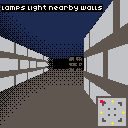
This is computed per-ray, not per-pixel, so it's cheap — the lamp light applies uniformly down each wall stripe. Walk toward the lamp positions (yellow dots on the minimap) and you'll see walls brighten as you enter a lamp's radius.
Going Further
- Flickering torch — randomize
TORCH_STRENGTHslightly each frame withrnd()for an organic, unsteady feel - Colored lighting — use
pal()to remap palette colors near a light source, shifting wall colors toward warm tones near lamps - Dynamic lights — light sources that move through the world, like a thrown torch or a glowing projectile
- Day/night cycle — gradually change
MAX_DISTover time to transition between bright outdoor scenes and deep fog - Fog color — instead of darkening to black, darken toward dark blue for night or grey for mist by adjusting the
darkentable - Lamp flicker — animate each lamp's radius with a sine wave or noise function for atmospheric pulsing