How to Add Game Juice
You built the game. The mechanics work. But something feels off — hits don't land, the ball bounces like it's made of spreadsheets, and breaking a brick has all the drama of checking a box. The game is correct, but it isn't alive.
That's what juice fixes. It's the visual feedback that makes correct feel good: a flash when something breaks, particles flying out of the impact, text that pulses instead of sitting dead, movement that eases instead of snapping. None of it changes the rules — it changes how the rules feel.
We're going to build a breakout game from scratch, then layer on four techniques: background pulses and screen flash, freeze frames, particle bursts, and easing. Each one is small. Together they turn a flat prototype into something that feels like a game.
The Base Game
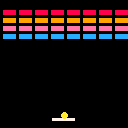
Before we can add juice, we need something to juice. Here's a minimal breakout: a paddle at the bottom, a ball that bounces, and a grid of bricks to break. No effects, no polish — just the mechanics.
The bricks sit in an 8x4 grid. Each one is 14 pixels wide and 6 tall, with 2-pixel gaps. Four rows, four colors:
let bricks = [];
let rowColors = [8, 9, 14, 12];

function buildBricks() {
    bricks = [];
    for (let row = 0; row < 4; row++) {
        for (let col = 0; col < 8; col++) {
            bricks.push({
                x: 3 + col * 16,
                y: 10 + row * 8,
                color: rowColors[row],
                active: true,
            });
        }
    }
}
The active flag lets us "break" a brick without removing it from the array. We skip inactive bricks when drawing and checking collisions.
The paddle moves with the arrow keys via btn() for smooth held-down movement. The ball sits on the paddle until you press Z, then launches upward at a slight angle:
if (!launched) {
    ballX = paddleX + paddleW / 2;
    ballY = paddleY - ballR;
    if (btnp('z')) {
        launched = true;
        ballDx = 1;
        ballDy = -2;
    }
    return;
}
Collision is straightforward. The ball bounces off walls by flipping its velocity on the relevant axis. Paddle hits flip dy and angle dx based on where the ball lands — center goes straight up, edges go wide:
if (ballDy > 0 && ballY + ballR >= paddleY && ballY + ballR <= paddleY + paddleH
    && ballX >= paddleX && ballX <= paddleX + paddleW) {
    ballDy = -ballDy;
    let hit = (ballX - paddleX) / paddleW;
    ballDx = (hit - 0.5) * 4;
    ballY = paddleY - ballR;
}
Brick hits flip dy and deactivate the brick. If the ball falls off the bottom, it resets onto the paddle.
Give it a play. The mechanics work. But breaking a brick feels like nothing happened — same as bouncing off a wall, same as hitting the paddle. Everything is equally flat.
Background Pulse, Screen Flash, and Freeze Frames
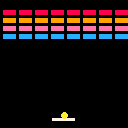
The simplest juice trick is changing the background color for a few frames when something happens. Instead of cls(0) every frame, we swap to cls(1) — dark blue — for 3 frames after a brick breaks:
let bgFlashTimer = 0;

// in brick collision:
bgFlashTimer = 3;

// in draw():
if (bgFlashTimer > 0) {
    bgFlashTimer--;
    cls(1);
} else {
    cls(0);
}
It's barely visible if you're looking for it, but your brain registers the change. The screen "reacts" to the hit.
For bigger moments, a full screen flash works better. When the ball falls off the bottom, we overlay a red rectangle that flickers on alternating frames:
let flashTimer = 0;
let flashColor = 0;

function flash(color, duration) {
    flashColor = color;
    flashTimer = duration;
}

// in resetBall():
flash(8, 6);

// in draw(), after everything else:
if (flashTimer > 0) {
    flashTimer--;
    if (flashTimer % 2 === 0) {
        rectfill(0, 0, 127, 127, flashColor);
    }
}
The alternating-frame trick matters. A solid red overlay for 6 frames just looks like a glitch. Flickering it on and off makes it feel like a camera flash — brief, intense, gone. Your brain reads it as impact, not error.
Freeze frames round out the trio. When you clear an entire row, the game pauses for 6 frames — no movement, no input, just a beat of stillness before everything resumes:
let freezeTimer = 0;

// in update(), at the very top:
if (freezeTimer > 0) {
    freezeTimer--;
    return;
}

// after breaking a brick:
if (countRow(row) === 0) {
    freezeTimer = 6;
}
That early return is the whole technique. While freezeTimer is positive, update does nothing — the ball hangs in the air, the paddle ignores input, everything holds still. Six frames is about a tenth of a second. Long enough to feel deliberate, short enough not to feel like a bug.
Screen shake works the same way — offset the camera by a random amount each frame and decay it toward zero. The bullet heaven tutorial covers it in detail.
Particle Bursts
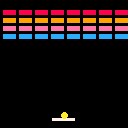
Flashes and freezes affect the whole screen. Particles are localized — they spray out from a specific point, giving the player's eye something to follow. When a brick breaks, colored dots fly out of the impact. When the ball falls off the bottom, a bigger white burst marks the loss.
The particle system is a capped pool. Each particle has a position, velocity, lifetime, and color:
let PARTICLE_CAP = 60;
let particles = [];

function burst(x, y, color, count) {
    for (let i = 0; i < count; i++) {
        if (particles.length >= PARTICLE_CAP) {
            let found = false;
            for (let p of particles) {
                if (!p.active) {
                    p.x = x;
                    p.y = y;
                    p.dx = (rnd() - 0.5) * 3;
                    p.dy = (rnd() - 0.5) * 3;
                    p.life = 15 + Math.floor(rnd() * 10);
                    p.maxLife = p.life;
                    p.color = color;
                    p.active = true;
                    found = true;
                    break;
                }
            }
            if (!found) continue;
        } else {
            particles.push({
                x: x,
                y: y,
                dx: (rnd() - 0.5) * 3,
                dy: (rnd() - 0.5) * 3,
                life: 15 + Math.floor(rnd() * 10),
                maxLife: 15,
                color: color,
                active: true,
            });
        }
    }
}
The cap prevents runaway allocation. Once we hit 60 particles, new bursts recycle dead ones instead of growing the array. rnd() returns a value between 0 and 1, so (rnd() - 0.5) * 3 gives each particle a random velocity in both axes — they spray outward in all directions.
Each frame, particles drift, pick up a tiny bit of gravity, and count down their life:
for (let p of particles) {
    if (!p.active) continue;
    p.x += p.dx;
    p.y += p.dy;
    p.dy += 0.05;
    p.life--;
    if (p.life <= 0) p.active = false;
}
That gravity (dy += 0.05) is subtle but it matters. Without it, particles drift in straight lines and look mechanical. With it, they arc downward and feel physical — like debris, not confetti in zero-g.
Drawing uses the life ratio to shrink particles as they age. Fresh particles are 2x2 rectfill squares. Past half their lifetime, they drop to single-pixel pset dots before disappearing:
for (let p of particles) {
    if (!p.active) continue;
    if (p.life > p.maxLife * 0.5) {
        rectfill(p.x, p.y, p.x + 1, p.y + 1, p.color);
    } else {
        pset(p.x, p.y, p.color);
    }
}
Brick breaks get a small burst of 4 particles in the brick's color. Ball loss gets a larger burst of 8 white particles. Different sizes create a visual hierarchy — small feedback for routine events, big feedback for the important ones.
Pulsing and Easing
Everything so far has been reactive — something happens, an effect fires. Pulsing is different. It runs all the time, giving static elements a sense of life even when nothing's happening.
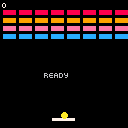
The trick is Math.sin on a frame counter. A global tick increments every frame, and we feed it into a sine wave to oscillate between two states:
let tick = 0;

// in update():
tick++;

// in draw():
if (!launched && !cleared) {
    let pulse = Math.sin(tick * 0.1);
    let col = pulse > 0 ? 7 : 6;
    text('READY', 44, 70, col);
}
The 0.1 multiplier controls speed — lower values pulse slower. The "READY" text alternates between white (7) and dark grey (6), creating a breathing effect that says "hey, press something." When all bricks are cleared, a similar pulse cycles through three colors for the "CLEARED!" text.
Easing applies the same idea to movement. Instead of things snapping into position, they glide. easeOutQuad takes a value from 0 to 1 and returns a curve that starts fast and decelerates:
function easeOutQuad(t) {
    return t * (2 - t);
}
When the game starts, bricks slide in from 20 pixels above their final position over 20 frames. Each brick stores its baseY (where it should end up) and draws at an offset based on the easing curve:
let t = animTimer < animDuration ? easeOutQuad(animTimer / animDuration) : 1;

for (let b of bricks) {
    if (!b.active) continue;
    let drawY = b.baseY - 20 + 20 * t;
    rectfill(b.x, drawY, b.x + 13, drawY + 5, b.color);
}
At frame 0, t is 0 and bricks draw 20 pixels too high. At frame 20, t is 1 and they're home. The easing curve means they cover most of the distance in the first few frames and gently settle into place — like something sliding to a stop.
The score uses a different approach. Instead of a timed animation, it lerps toward the target every frame:
if (displayScore < score) {
    displayScore += (score - displayScore) * 0.2;
    if (score - displayScore < 1) displayScore = score;
}
Each frame, displayScore closes 20% of the gap between itself and score. Break a brick worth 10 points and the display doesn't jump from 0 to 10 — it climbs 2, then 1.6, then 1.3, then snaps to 10 when the gap drops below 1. The result is a score that rolls up smoothly after each hit.
Going Further
- Screen shake — Combine everything here with the camera-offset shake from the bullet heaven tutorial. Shake on row clear, flash on hit, particles on break — stacking effects on the same event is where juice really compounds.
- Trail effects — Store the ball's last 4-5 positions and draw faded copies behind it. Use decreasing colors (white, light grey, dark grey) for a comet tail. Cheap to add, and it immediately makes movement feel faster.
- Squash and stretch — Deform the ball on bounce. When it hits the paddle, briefly widen it horizontally and squash it vertically. Wall hits, do the opposite. A few frames of distortion sells the impact better than any flash.
- Juice stacking — The real power is combining techniques on a single event. A brick break could fire a background pulse + particles + freeze frame + score bump all at once. Each effect is small on its own. Together they make a moment feel important.
- Sound effects — Pair visual juice with
sfx()calls for multi-sensory feedback. A short blip on brick break, a deeper tone on row clear, a crash on ball loss. Sound and visuals reinforce each other — one without the other always feels incomplete.