How to Build a State Machine
Most games need more than one screen. You've got a title screen, the actual gameplay, a game over screen, maybe a pause menu. The question is: how do you organize all of that without your code turning into a mess?
The answer is a state machine — and it's way simpler than it sounds. One variable tracks which screen is active, and each screen owns its own update and draw logic. No library, no framework. Just a variable and some if statements.
We're gonna build a little game called Catch the Falling Stars to learn the pattern. Stars fall from the top, you move a catcher left and right to collect them, and missing three ends the game. The mechanics are deliberately trivial — the point is the state management, not the game.
Everything in One Function
Let's start with the game and zero state management. The engine gives us update for game logic and draw for rendering, but there's no concept of screens — everything just runs every frame:
engine.scope(({ start, cls, rectfill, circfill, text, btn, rnd }) => {
    let catcherX = 56;
    let score = 0;
    let lives = 3;
    let gameOver = false;
    let stars = [];
    let frameCount = 0;

    function update() {
        if (gameOver) return;

        frameCount++;

        if (btn('ArrowLeft') && catcherX > 0) catcherX -= 2;
        if (btn('ArrowRight') && catcherX < 112) catcherX += 2;

        if (frameCount % 40 === 0) {
            stars.push({ x: 4 + rnd(120), y: 0, speed: 0.8 });
        }

        for (let i = stars.length - 1; i >= 0; i--) {
            stars[i].y += stars[i].speed;

            if (stars[i].y >= 116 && stars[i].x >= catcherX && stars[i].x <= catcherX + 16) {
                score++;
                stars.splice(i, 1);
                continue;
            }

            if (stars[i].y > 128) {
                lives--;
                stars.splice(i, 1);
                if (lives <= 0) gameOver = true;
            }
        }
    }

    function draw() {
        if (gameOver) {
            cls(0);
            text('GAME OVER', 34, 58, 8);
            text('SCORE: ' + score, 40, 70, 7);
            return;
        }

        cls(1);
        for (let i = 0; i < stars.length; i++) {
            circfill(stars[i].x, stars[i].y, 2, 10);
        }
        rectfill(catcherX, 118, catcherX + 16, 122, 12);
        text('SCORE: ' + score, 2, 2, 7);
        text('LIVES: ' + lives, 92, 2, 7);
    }

    start({ sprites: {}, sounds: {}, update, draw, target });
});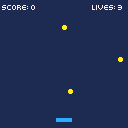
It works. But try losing all three lives.
The game shows "GAME OVER" and... that's it. No title screen, no way to restart. The gameOver boolean is doing double duty — it's both a state flag and a rendering branch. Want to add a title screen or a pause menu? That means nesting more if checks into already crowded functions. It gets ugly fast.
Introducing the Mode Variable
Instead of a boolean that tracks one thing, we use a string that tracks which screen is active. Every frame, we check the mode and run only the logic for that screen:
engine.scope(({ start, cls, rectfill, circfill, text, btn, btnp, rnd }) => {
    let mode = 'title';
    let catcherX, score, lives, stars, frameCount;

    function resetGame() {
        catcherX = 56;
        score = 0;
        lives = 3;
        stars = [];
        frameCount = 0;
    }

    resetGame();

    function update() {
        if (mode === 'title') {
            if (btnp('z')) {
                resetGame();
                mode = 'playing';
            }
            return;
        }

        if (mode === 'gameover') {
            if (btnp('z')) {
                mode = 'title';
            }
            return;
        }

        frameCount++;

        if (btn('ArrowLeft') && catcherX > 0) catcherX -= 2;
        if (btn('ArrowRight') && catcherX < 112) catcherX += 2;

        if (frameCount % 40 === 0) {
            stars.push({ x: 4 + rnd(120), y: 0, speed: 0.8 });
        }

        for (let i = stars.length - 1; i >= 0; i--) {
            stars[i].y += stars[i].speed;

            if (stars[i].y >= 116 && stars[i].x >= catcherX && stars[i].x <= catcherX + 16) {
                score++;
                stars.splice(i, 1);
                continue;
            }

            if (stars[i].y > 128) {
                lives--;
                stars.splice(i, 1);
                if (lives <= 0) mode = 'gameover';
            }
        }
    }

    function draw() {
        if (mode === 'title') {
            cls(2);
            text('CATCH THE', 36, 40, 7);
            text('FALLING STARS', 26, 50, 10);
            text('PRESS Z TO START', 20, 80, 6);
            return;
        }

        if (mode === 'gameover') {
            cls(0);
            text('GAME OVER', 34, 50, 8);
            text('SCORE: ' + score, 40, 62, 7);
            text('Z TO RETRY', 32, 80, 6);
            return;
        }

        cls(1);
        for (let i = 0; i < stars.length; i++) {
            circfill(stars[i].x, stars[i].y, 2, 10);
        }
        rectfill(catcherX, 118, catcherX + 16, 122, 12);
        text('SCORE: ' + score, 2, 2, 7);
        text('LIVES: ' + lives, 92, 2, 7);
    }

    start({ sprites: {}, sounds: {}, update, draw, target });
});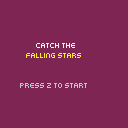
let mode = 'title' replaces the old gameOver boolean — it can be 'title', 'playing', or 'gameover'. We've also pulled all the game variables into a resetGame() function so we can cleanly restart without forgetting something. Transitions are just string assignments: btnp('z') on the title sets mode = 'playing', losing all lives sets mode = 'gameover', and Z on game over goes back to the title.
One variable controls the entire flow: title → playing → game over → title → and so on.
One Function Per State
The mode variable works, but both update and draw are getting crowded. Each one has inline branching for every mode, and adding a fourth state means adding another block to both functions. That gets unwieldy fast.
The fix is one function per state per responsibility. Each state gets its own update and draw function, and a dispatcher routes to the right one:
function updateTitle() {
    if (btnp('z')) {
        resetGame();
        mode = 'playing';
    }
}

function updatePlaying() {
    frameCount++;
    if (btn('ArrowLeft') && catcherX > 0) catcherX -= 2;
    if (btn('ArrowRight') && catcherX < 112) catcherX += 2;
    // ... star spawning, collision, etc.
}

function updateGameover() {
    if (btnp('z')) mode = 'title';
}
Draw functions follow the same pattern — drawTitle(), drawPlaying(), drawGameover(). Then the dispatchers route to the right function by mode:
function update() {
    if (mode === 'title') updateTitle();
    else if (mode === 'playing') updatePlaying();
    else if (mode === 'gameover') updateGameover();
}

function draw() {
    if (mode === 'title') drawTitle();
    else if (mode === 'playing') drawPlaying();
    else if (mode === 'gameover') drawGameover();
}
Now adding a new state means writing two functions and adding one line to each dispatcher. No nesting deeper, no touching existing state logic.
Timed Transitions
Not every state waits for player input. Sometimes you want to flash a message for a fixed duration and then go back to gameplay. The pattern is a timer that decrements each frame, with a helper function that sets it up:
let messageText, messageTimer;

function showMessage(msg, frames) {
    messageText = msg;
    messageTimer = frames;
    mode = 'message';
}
The message state's update function is about as simple as it gets — decrement the timer, and when it hits zero, switch back to playing:
function updateMessage() {
    messageTimer--;
    if (messageTimer <= 0) mode = 'playing';
}
We use this for level-up notifications. Every 10 points the level increases (stars fall faster and spawn more often), and showMessage pauses the game for one second to announce it:
if (score > 0 && score % 10 === 0) {
    level++;
    showMessage('LEVEL ' + level + '!', 60);
}
Here's the full game with function-per-state organization and the message timer:
engine.scope(({ start, cls, rectfill, circfill, text, btn, btnp, rnd }) => {
    let mode = 'title';
    let catcherX, score, lives, stars, frameCount, level;
    let messageText, messageTimer;

    function resetGame() {
        catcherX = 56;
        score = 0;
        lives = 3;
        stars = [];
        frameCount = 0;
        level = 1;
    }

    function showMessage(msg, frames) {
        messageText = msg;
        messageTimer = frames;
        mode = 'message';
    }

    resetGame();

    function updateTitle() {
        if (btnp('z')) {
            resetGame();
            mode = 'playing';
        }
    }

    function updatePlaying() {
        frameCount++;

        if (btn('ArrowLeft') && catcherX > 0) catcherX -= 2;
        if (btn('ArrowRight') && catcherX < 112) catcherX += 2;

        let spawnRate = Math.max(15, 40 - level * 5);
        if (frameCount % spawnRate === 0) {
            stars.push({ x: 4 + rnd(120), y: 0, speed: 0.5 + level * 0.3 });
        }

        for (let i = stars.length - 1; i >= 0; i--) {
            stars[i].y += stars[i].speed;

            if (stars[i].y >= 116 && stars[i].x >= catcherX && stars[i].x <= catcherX + 16) {
                score++;
                stars.splice(i, 1);
                if (score > 0 && score % 10 === 0) {
                    level++;
                    showMessage('LEVEL ' + level + '!', 60);
                }
                continue;
            }

            if (stars[i].y > 128) {
                lives--;
                stars.splice(i, 1);
                if (lives <= 0) mode = 'gameover';
            }
        }
    }

    function updateMessage() {
        messageTimer--;
        if (messageTimer <= 0) mode = 'playing';
    }

    function updateGameover() {
        if (btnp('z')) mode = 'title';
    }

    function drawTitle() {
        cls(2);
        text('CATCH THE', 36, 40, 7);
        text('FALLING STARS', 26, 50, 10);
        text('PRESS Z TO START', 20, 80, 6);
    }

    function drawPlaying() {
        cls(1);
        for (let i = 0; i < stars.length; i++) {
            circfill(stars[i].x, stars[i].y, 2, 10);
        }
        rectfill(catcherX, 118, catcherX + 16, 122, 12);
        text('SCORE: ' + score, 2, 2, 7);
        text('LIVES: ' + lives, 92, 2, 7);
        text('LV ' + level, 52, 2, 6);
    }

    function drawMessage() {
        cls(1);
        for (let i = 0; i < stars.length; i++) {
            circfill(stars[i].x, stars[i].y, 2, 10);
        }
        rectfill(catcherX, 118, catcherX + 16, 122, 12);
        rectfill(24, 48, 104, 72, 0);
        text(messageText, 38, 56, 10);
    }

    function drawGameover() {
        cls(0);
        text('GAME OVER', 34, 50, 8);
        text('SCORE: ' + score, 40, 62, 7);
        text('Z TO RETRY', 32, 80, 6);
    }

    function update() {
        if (mode === 'title') updateTitle();
        else if (mode === 'playing') updatePlaying();
        else if (mode === 'message') updateMessage();
        else if (mode === 'gameover') updateGameover();
    }

    function draw() {
        if (mode === 'title') drawTitle();
        else if (mode === 'playing') drawPlaying();
        else if (mode === 'message') drawMessage();
        else if (mode === 'gameover') drawGameover();
    }

    start({ sprites: {}, sounds: {}, update, draw, target });
});
The 'message' state is the first one that doesn't care what comes after it — it always returns to 'playing'. The next section generalizes that idea into a transition that can go anywhere.
Transition Effects
A screen flash between states makes transitions feel deliberate instead of instant. The pattern is the same as the message timer — a dedicated state with a counter — but this time we store where to go next:
let transitionTimer, nextMode;

function startTransition(to) {
    transitionTimer = 12;
    nextMode = to;
    mode = 'transition';
}
The transition alternates between black and white each frame for a brief flash, then enters whatever mode was requested:
function updateTransition() {
    transitionTimer--;
    if (transitionTimer <= 0) mode = nextMode;
}

function drawTransition() {
    cls(transitionTimer % 2 === 0 ? 7 : 0);
}
Now instead of setting mode directly, we go through the flash: startTransition('playing') from the title screen, startTransition('title') from game over. The transition doesn't know or care what comes before or after it — it just counts down and switches.
Complete Example
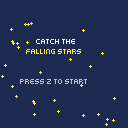
Here's everything together — five states (title, transition, playing, message, gameover), function-per-state organization, animated background stars on the title screen, screen-flash transitions, and high score tracking across retries:
engine.scope(({ start, cls, rectfill, circfill, text, btn, btnp, rnd }) => {
    let mode = 'title';
    let catcherX, score, lives, stars, frameCount, level, highScore;
    let messageText, messageTimer;
    let transitionTimer, nextMode;
    let bgStars = [];

    highScore = 0;

    for (let i = 0; i < 30; i++) {
        bgStars.push({ x: rnd(128), y: rnd(128), speed: 0.1 + rnd(3) * 0.1 });
    }

    function resetGame() {
        catcherX = 56;
        score = 0;
        lives = 3;
        stars = [];
        frameCount = 0;
        level = 1;
    }

    function showMessage(msg, frames) {
        messageText = msg;
        messageTimer = frames;
        mode = 'message';
    }

    function startTransition(to) {
        transitionTimer = 12;
        nextMode = to;
        mode = 'transition';
    }

    function updateTitle() {
        for (let i = 0; i < bgStars.length; i++) {
            bgStars[i].y += bgStars[i].speed;
            if (bgStars[i].y > 128) {
                bgStars[i].y = 0;
                bgStars[i].x = rnd(128);
            }
        }
        if (btnp('z')) {
            resetGame();
            startTransition('playing');
        }
    }

    function updateTransition() {
        transitionTimer--;
        if (transitionTimer <= 0) mode = nextMode;
    }

    function updatePlaying() {
        frameCount++;

        if (btn('ArrowLeft') && catcherX > 0) catcherX -= 2;
        if (btn('ArrowRight') && catcherX < 112) catcherX += 2;

        let spawnRate = Math.max(15, 40 - level * 5);
        if (frameCount % spawnRate === 0) {
            stars.push({ x: 4 + rnd(120), y: 0, speed: 0.5 + level * 0.3 });
        }

        for (let i = stars.length - 1; i >= 0; i--) {
            stars[i].y += stars[i].speed;

            if (stars[i].y >= 116 && stars[i].x >= catcherX && stars[i].x <= catcherX + 16) {
                score++;
                stars.splice(i, 1);
                if (score > 0 && score % 10 === 0) {
                    level++;
                    showMessage('LEVEL ' + level + '!', 60);
                }
                continue;
            }

            if (stars[i].y > 128) {
                lives--;
                stars.splice(i, 1);
                if (lives <= 0) {
                    if (score > highScore) highScore = score;
                    mode = 'gameover';
                }
            }
        }
    }

    function updateMessage() {
        messageTimer--;
        if (messageTimer <= 0) mode = 'playing';
    }

    function updateGameover() {
        if (btnp('z')) startTransition('title');
    }

    function drawTitle() {
        cls(1);
        for (let i = 0; i < bgStars.length; i++) {
            circfill(bgStars[i].x, bgStars[i].y, 1, 10);
        }
        text('CATCH THE', 36, 36, 7);
        text('FALLING STARS', 26, 46, 10);
        text('PRESS Z TO START', 20, 76, 6);
        if (highScore > 0) {
            text('BEST: ' + highScore, 44, 90, 9);
        }
    }

    function drawTransition() {
        cls(transitionTimer % 2 === 0 ? 7 : 0);
    }

    function drawPlaying() {
        cls(1);
        for (let i = 0; i < stars.length; i++) {
            circfill(stars[i].x, stars[i].y, 2, 10);
        }
        rectfill(catcherX, 118, catcherX + 16, 122, 12);
        text('SCORE: ' + score, 2, 2, 7);
        text('LIVES: ' + lives, 92, 2, 7);
        text('LV ' + level, 52, 2, 6);
    }

    function drawMessage() {
        cls(1);
        for (let i = 0; i < stars.length; i++) {
            circfill(stars[i].x, stars[i].y, 2, 10);
        }
        rectfill(catcherX, 118, catcherX + 16, 122, 12);
        rectfill(24, 48, 104, 72, 0);
        text(messageText, 38, 56, 10);
    }

    function drawGameover() {
        cls(0);
        text('GAME OVER', 34, 44, 8);
        text('SCORE: ' + score, 40, 58, 7);
        if (highScore > 0) {
            text('BEST: ' + highScore, 44, 70, 9);
        }
        text('Z TO RETRY', 32, 86, 6);
    }

    function update() {
        if (mode === 'title') updateTitle();
        else if (mode === 'transition') updateTransition();
        else if (mode === 'playing') updatePlaying();
        else if (mode === 'message') updateMessage();
        else if (mode === 'gameover') updateGameover();
    }

    function draw() {
        if (mode === 'title') drawTitle();
        else if (mode === 'transition') drawTransition();
        else if (mode === 'playing') drawPlaying();
        else if (mode === 'message') drawMessage();
        else if (mode === 'gameover') drawGameover();
    }

    start({ sprites: {}, sounds: {}, update, draw, target });
});
Five states, under 140 lines, and every screen is cleanly separated. The update and draw dispatchers at the bottom are the entire routing system — you can read them and immediately see every state the game can be in. That's neat.
Going Further
- Pause state — press Escape to add a
'paused'mode that freezes everything and shows "PAUSED" over the gameplay screen - Settings menu — a state for adjusting difficulty before starting, letting the player pick starting level or lives
- Animated transitions — replace the flash with a fade effect using increasingly opaque
rectfilloverlays - State machine as an object — wrap mode/transition logic into a reusable class with
enter/exit/update/drawper state, so adding a new state means implementing an interface instead of editing the dispatcher - Persisting high scores — use
localStorageto save the best score between sessions (the save/load tutorial covers this pattern)