Cómo Construir una Máquina de Estados
La mayoría de los juegos necesitan más de una pantalla. Tienes una pantalla de título, el gameplay en sí, una pantalla de game over, quizás un menú de pausa. La pregunta es: ¿cómo organizas todo eso sin que tu código se convierta en un desastre?
La respuesta es una máquina de estados — y es mucho más simple de lo que suena. Una variable rastrea qué pantalla está activa, y cada pantalla tiene su propia lógica de actualización y dibujado. Sin librería, sin framework. Solo una variable y algunos if.
Vamos a construir un pequeño juego llamado Catch the Falling Stars para aprender el patrón. Estrellas caen desde arriba, mueves un receptor a izquierda y derecha para recolectarlas, y fallar tres termina el juego. La mecánica es deliberadamente trivial — el punto es la gestión de estados, no el juego.
Todo en Una Sola Función
Empecemos con el juego y cero gestión de estados. El motor nos da update para la lógica del juego y draw para el renderizado, pero no hay concepto de pantallas — todo simplemente se ejecuta cada frame:
engine.scope(({ start, cls, rectfill, circfill, text, btn, rnd }) => {
    let catcherX = 56;
    let score = 0;
    let lives = 3;
    let gameOver = false;
    let stars = [];
    let frameCount = 0;

    function update() {
        if (gameOver) return;

        frameCount++;

        if (btn('ArrowLeft') && catcherX > 0) catcherX -= 2;
        if (btn('ArrowRight') && catcherX < 112) catcherX += 2;

        if (frameCount % 40 === 0) {
            stars.push({ x: 4 + rnd(120), y: 0, speed: 0.8 });
        }

        for (let i = stars.length - 1; i >= 0; i--) {
            stars[i].y += stars[i].speed;

            if (stars[i].y >= 116 && stars[i].x >= catcherX && stars[i].x <= catcherX + 16) {
                score++;
                stars.splice(i, 1);
                continue;
            }

            if (stars[i].y > 128) {
                lives--;
                stars.splice(i, 1);
                if (lives <= 0) gameOver = true;
            }
        }
    }

    function draw() {
        if (gameOver) {
            cls(0);
            text('GAME OVER', 34, 58, 8);
            text('SCORE: ' + score, 40, 70, 7);
            return;
        }

        cls(1);
        for (let i = 0; i < stars.length; i++) {
            circfill(stars[i].x, stars[i].y, 2, 10);
        }
        rectfill(catcherX, 118, catcherX + 16, 122, 12);
        text('SCORE: ' + score, 2, 2, 7);
        text('LIVES: ' + lives, 92, 2, 7);
    }

    start({ sprites: {}, sounds: {}, update, draw, target });
});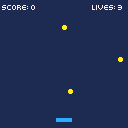
Funciona. Pero intenta perder las tres vidas.
El juego muestra "GAME OVER" y... eso es todo. Sin pantalla de título, sin forma de reiniciar. El booleano gameOver está haciendo doble trabajo — es tanto un flag de estado como una rama de renderizado. ¿Quieres agregar una pantalla de título o un menú de pausa? Eso significa anidar más verificaciones if dentro de funciones ya saturadas. Se pone feo rápido.
Introduciendo la Variable de Modo
En vez de un booleano que rastrea una cosa, usamos un string que rastrea qué pantalla está activa. Cada frame, verificamos el modo y ejecutamos solo la lógica para esa pantalla:
engine.scope(({ start, cls, rectfill, circfill, text, btn, btnp, rnd }) => {
    let mode = 'title';
    let catcherX, score, lives, stars, frameCount;

    function resetGame() {
        catcherX = 56;
        score = 0;
        lives = 3;
        stars = [];
        frameCount = 0;
    }

    resetGame();

    function update() {
        if (mode === 'title') {
            if (btnp('z')) {
                resetGame();
                mode = 'playing';
            }
            return;
        }

        if (mode === 'gameover') {
            if (btnp('z')) {
                mode = 'title';
            }
            return;
        }

        frameCount++;

        if (btn('ArrowLeft') && catcherX > 0) catcherX -= 2;
        if (btn('ArrowRight') && catcherX < 112) catcherX += 2;

        if (frameCount % 40 === 0) {
            stars.push({ x: 4 + rnd(120), y: 0, speed: 0.8 });
        }

        for (let i = stars.length - 1; i >= 0; i--) {
            stars[i].y += stars[i].speed;

            if (stars[i].y >= 116 && stars[i].x >= catcherX && stars[i].x <= catcherX + 16) {
                score++;
                stars.splice(i, 1);
                continue;
            }

            if (stars[i].y > 128) {
                lives--;
                stars.splice(i, 1);
                if (lives <= 0) mode = 'gameover';
            }
        }
    }

    function draw() {
        if (mode === 'title') {
            cls(2);
            text('CATCH THE', 36, 40, 7);
            text('FALLING STARS', 26, 50, 10);
            text('PRESS Z TO START', 20, 80, 6);
            return;
        }

        if (mode === 'gameover') {
            cls(0);
            text('GAME OVER', 34, 50, 8);
            text('SCORE: ' + score, 40, 62, 7);
            text('Z TO RETRY', 32, 80, 6);
            return;
        }

        cls(1);
        for (let i = 0; i < stars.length; i++) {
            circfill(stars[i].x, stars[i].y, 2, 10);
        }
        rectfill(catcherX, 118, catcherX + 16, 122, 12);
        text('SCORE: ' + score, 2, 2, 7);
        text('LIVES: ' + lives, 92, 2, 7);
    }

    start({ sprites: {}, sounds: {}, update, draw, target });
});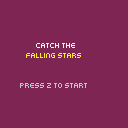
let mode = 'title' reemplaza el viejo booleano gameOver — puede ser 'title', 'playing', o 'gameover'. También sacamos todas las variables del juego a una función resetGame() para poder reiniciar limpiamente sin olvidar nada. Las transiciones son simples asignaciones de strings: btnp('z') en el título establece mode = 'playing', perder todas las vidas establece mode = 'gameover', y Z en game over vuelve al título.
Una variable controla todo el flujo: título → jugando → game over → título → y así sucesivamente.
Una Función Por Estado
La variable de modo funciona, pero tanto update como draw se están llenando. Cada una tiene ramificaciones en línea para cada modo, y agregar un cuarto estado significa agregar otro bloque a ambas funciones. Eso se vuelve difícil de manejar rápido.
La solución es una función por estado por responsabilidad. Cada estado tiene su propia función de update y draw, y un despachador dirige a la correcta:
function updateTitle() {
    if (btnp('z')) {
        resetGame();
        mode = 'playing';
    }
}

function updatePlaying() {
    frameCount++;
    if (btn('ArrowLeft') && catcherX > 0) catcherX -= 2;
    if (btn('ArrowRight') && catcherX < 112) catcherX += 2;
    // ... aparición de estrellas, colisión, etc.
}

function updateGameover() {
    if (btnp('z')) mode = 'title';
}
Las funciones de draw siguen el mismo patrón — drawTitle(), drawPlaying(), drawGameover(). Luego los despachadores dirigen a la función correcta según el modo:
function update() {
    if (mode === 'title') updateTitle();
    else if (mode === 'playing') updatePlaying();
    else if (mode === 'gameover') updateGameover();
}

function draw() {
    if (mode === 'title') drawTitle();
    else if (mode === 'playing') drawPlaying();
    else if (mode === 'gameover') drawGameover();
}
Ahora agregar un nuevo estado significa escribir dos funciones y agregar una línea a cada despachador. Sin anidar más profundo, sin tocar la lógica de estados existente.
Transiciones Temporizadas
No todos los estados esperan entrada del jugador. A veces quieres mostrar un mensaje por una duración fija y luego volver al gameplay. El patrón es un temporizador que decrementa cada frame, con una función helper que lo configura:
let messageText, messageTimer;

function showMessage(msg, frames) {
    messageText = msg;
    messageTimer = frames;
    mode = 'message';
}
La función de update del estado mensaje es bastante simple — decrementa el temporizador, y cuando llega a cero, vuelve a playing:
function updateMessage() {
    messageTimer--;
    if (messageTimer <= 0) mode = 'playing';
}
Usamos esto para notificaciones de subida de nivel. Cada 10 puntos el nivel aumenta (las estrellas caen más rápido y aparecen más seguido), y showMessage pausa el juego un segundo para anunciarlo:
if (score > 0 && score % 10 === 0) {
    level++;
    showMessage('LEVEL ' + level + '!', 60);
}
Aquí está el juego completo con organización función-por-estado y el temporizador de mensajes:
engine.scope(({ start, cls, rectfill, circfill, text, btn, btnp, rnd }) => {
    let mode = 'title';
    let catcherX, score, lives, stars, frameCount, level;
    let messageText, messageTimer;

    function resetGame() {
        catcherX = 56;
        score = 0;
        lives = 3;
        stars = [];
        frameCount = 0;
        level = 1;
    }

    function showMessage(msg, frames) {
        messageText = msg;
        messageTimer = frames;
        mode = 'message';
    }

    resetGame();

    function updateTitle() {
        if (btnp('z')) {
            resetGame();
            mode = 'playing';
        }
    }

    function updatePlaying() {
        frameCount++;

        if (btn('ArrowLeft') && catcherX > 0) catcherX -= 2;
        if (btn('ArrowRight') && catcherX < 112) catcherX += 2;

        let spawnRate = Math.max(15, 40 - level * 5);
        if (frameCount % spawnRate === 0) {
            stars.push({ x: 4 + rnd(120), y: 0, speed: 0.5 + level * 0.3 });
        }

        for (let i = stars.length - 1; i >= 0; i--) {
            stars[i].y += stars[i].speed;

            if (stars[i].y >= 116 && stars[i].x >= catcherX && stars[i].x <= catcherX + 16) {
                score++;
                stars.splice(i, 1);
                if (score > 0 && score % 10 === 0) {
                    level++;
                    showMessage('LEVEL ' + level + '!', 60);
                }
                continue;
            }

            if (stars[i].y > 128) {
                lives--;
                stars.splice(i, 1);
                if (lives <= 0) mode = 'gameover';
            }
        }
    }

    function updateMessage() {
        messageTimer--;
        if (messageTimer <= 0) mode = 'playing';
    }

    function updateGameover() {
        if (btnp('z')) mode = 'title';
    }

    function drawTitle() {
        cls(2);
        text('CATCH THE', 36, 40, 7);
        text('FALLING STARS', 26, 50, 10);
        text('PRESS Z TO START', 20, 80, 6);
    }

    function drawPlaying() {
        cls(1);
        for (let i = 0; i < stars.length; i++) {
            circfill(stars[i].x, stars[i].y, 2, 10);
        }
        rectfill(catcherX, 118, catcherX + 16, 122, 12);
        text('SCORE: ' + score, 2, 2, 7);
        text('LIVES: ' + lives, 92, 2, 7);
        text('LV ' + level, 52, 2, 6);
    }

    function drawMessage() {
        cls(1);
        for (let i = 0; i < stars.length; i++) {
            circfill(stars[i].x, stars[i].y, 2, 10);
        }
        rectfill(catcherX, 118, catcherX + 16, 122, 12);
        rectfill(24, 48, 104, 72, 0);
        text(messageText, 38, 56, 10);
    }

    function drawGameover() {
        cls(0);
        text('GAME OVER', 34, 50, 8);
        text('SCORE: ' + score, 40, 62, 7);
        text('Z TO RETRY', 32, 80, 6);
    }

    function update() {
        if (mode === 'title') updateTitle();
        else if (mode === 'playing') updatePlaying();
        else if (mode === 'message') updateMessage();
        else if (mode === 'gameover') updateGameover();
    }

    function draw() {
        if (mode === 'title') drawTitle();
        else if (mode === 'playing') drawPlaying();
        else if (mode === 'message') drawMessage();
        else if (mode === 'gameover') drawGameover();
    }

    start({ sprites: {}, sounds: {}, update, draw, target });
});
El estado 'message' es el primero que no le importa qué viene después — siempre vuelve a 'playing'. La siguiente sección generaliza esa idea en una transición que puede ir a cualquier parte.
Efectos de Transición
Un destello de pantalla entre estados hace que las transiciones se sientan deliberadas en vez de instantáneas. El patrón es el mismo que el temporizador de mensajes — un estado dedicado con un contador — pero esta vez almacenamos a dónde ir después:
let transitionTimer, nextMode;

function startTransition(to) {
    transitionTimer = 12;
    nextMode = to;
    mode = 'transition';
}
La transición alterna entre negro y blanco cada frame para un destello breve, luego entra al modo solicitado:
function updateTransition() {
    transitionTimer--;
    if (transitionTimer <= 0) mode = nextMode;
}

function drawTransition() {
    cls(transitionTimer % 2 === 0 ? 7 : 0);
}
Ahora en vez de establecer mode directamente, pasamos por el destello: startTransition('playing') desde la pantalla de título, startTransition('title') desde game over. La transición no sabe ni le importa qué viene antes o después — solo cuenta hacia atrás y cambia.
Ejemplo Completo
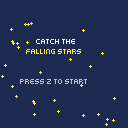
Aquí está todo junto — cinco estados (title, transition, playing, message, gameover), organización función-por-estado, estrellas de fondo animadas en la pantalla de título, transiciones con destello de pantalla, y seguimiento de puntuación máxima entre reintentos:
engine.scope(({ start, cls, rectfill, circfill, text, btn, btnp, rnd }) => {
    let mode = 'title';
    let catcherX, score, lives, stars, frameCount, level, highScore;
    let messageText, messageTimer;
    let transitionTimer, nextMode;
    let bgStars = [];

    highScore = 0;

    for (let i = 0; i < 30; i++) {
        bgStars.push({ x: rnd(128), y: rnd(128), speed: 0.1 + rnd(3) * 0.1 });
    }

    function resetGame() {
        catcherX = 56;
        score = 0;
        lives = 3;
        stars = [];
        frameCount = 0;
        level = 1;
    }

    function showMessage(msg, frames) {
        messageText = msg;
        messageTimer = frames;
        mode = 'message';
    }

    function startTransition(to) {
        transitionTimer = 12;
        nextMode = to;
        mode = 'transition';
    }

    function updateTitle() {
        for (let i = 0; i < bgStars.length; i++) {
            bgStars[i].y += bgStars[i].speed;
            if (bgStars[i].y > 128) {
                bgStars[i].y = 0;
                bgStars[i].x = rnd(128);
            }
        }
        if (btnp('z')) {
            resetGame();
            startTransition('playing');
        }
    }

    function updateTransition() {
        transitionTimer--;
        if (transitionTimer <= 0) mode = nextMode;
    }

    function updatePlaying() {
        frameCount++;

        if (btn('ArrowLeft') && catcherX > 0) catcherX -= 2;
        if (btn('ArrowRight') && catcherX < 112) catcherX += 2;

        let spawnRate = Math.max(15, 40 - level * 5);
        if (frameCount % spawnRate === 0) {
            stars.push({ x: 4 + rnd(120), y: 0, speed: 0.5 + level * 0.3 });
        }

        for (let i = stars.length - 1; i >= 0; i--) {
            stars[i].y += stars[i].speed;

            if (stars[i].y >= 116 && stars[i].x >= catcherX && stars[i].x <= catcherX + 16) {
                score++;
                stars.splice(i, 1);
                if (score > 0 && score % 10 === 0) {
                    level++;
                    showMessage('LEVEL ' + level + '!', 60);
                }
                continue;
            }

            if (stars[i].y > 128) {
                lives--;
                stars.splice(i, 1);
                if (lives <= 0) {
                    if (score > highScore) highScore = score;
                    mode = 'gameover';
                }
            }
        }
    }

    function updateMessage() {
        messageTimer--;
        if (messageTimer <= 0) mode = 'playing';
    }

    function updateGameover() {
        if (btnp('z')) startTransition('title');
    }

    function drawTitle() {
        cls(1);
        for (let i = 0; i < bgStars.length; i++) {
            circfill(bgStars[i].x, bgStars[i].y, 1, 10);
        }
        text('CATCH THE', 36, 36, 7);
        text('FALLING STARS', 26, 46, 10);
        text('PRESS Z TO START', 20, 76, 6);
        if (highScore > 0) {
            text('BEST: ' + highScore, 44, 90, 9);
        }
    }

    function drawTransition() {
        cls(transitionTimer % 2 === 0 ? 7 : 0);
    }

    function drawPlaying() {
        cls(1);
        for (let i = 0; i < stars.length; i++) {
            circfill(stars[i].x, stars[i].y, 2, 10);
        }
        rectfill(catcherX, 118, catcherX + 16, 122, 12);
        text('SCORE: ' + score, 2, 2, 7);
        text('LIVES: ' + lives, 92, 2, 7);
        text('LV ' + level, 52, 2, 6);
    }

    function drawMessage() {
        cls(1);
        for (let i = 0; i < stars.length; i++) {
            circfill(stars[i].x, stars[i].y, 2, 10);
        }
        rectfill(catcherX, 118, catcherX + 16, 122, 12);
        rectfill(24, 48, 104, 72, 0);
        text(messageText, 38, 56, 10);
    }

    function drawGameover() {
        cls(0);
        text('GAME OVER', 34, 44, 8);
        text('SCORE: ' + score, 40, 58, 7);
        if (highScore > 0) {
            text('BEST: ' + highScore, 44, 70, 9);
        }
        text('Z TO RETRY', 32, 86, 6);
    }

    function update() {
        if (mode === 'title') updateTitle();
        else if (mode === 'transition') updateTransition();
        else if (mode === 'playing') updatePlaying();
        else if (mode === 'message') updateMessage();
        else if (mode === 'gameover') updateGameover();
    }

    function draw() {
        if (mode === 'title') drawTitle();
        else if (mode === 'transition') drawTransition();
        else if (mode === 'playing') drawPlaying();
        else if (mode === 'message') drawMessage();
        else if (mode === 'gameover') drawGameover();
    }

    start({ sprites: {}, sounds: {}, update, draw, target });
});
Cinco estados, menos de 140 líneas, y cada pantalla está limpiamente separada. Los despachadores de update y draw al final son todo el sistema de enrutamiento — puedes leerlos e inmediatamente ver cada estado posible del juego. Genial.
Para Ir Más Allá
- Estado de pausa — presiona Escape para agregar un modo
'paused'que congele todo y muestre "PAUSADO" sobre la pantalla de juego - Menú de configuración — un estado para ajustar la dificultad antes de empezar, permitiendo al jugador elegir nivel inicial o vidas
- Transiciones animadas — reemplaza el destello con un efecto de desvanecimiento usando superposiciones de
rectfillcada vez más opacas - Máquina de estados como objeto — envuelve la lógica de modo/transición en una clase reutilizable con
enter/exit/update/drawpor estado, para que agregar un nuevo estado signifique implementar una interfaz en vez de editar el despachador - Persistir puntuaciones máximas — usa
localStoragepara guardar la mejor puntuación entre sesiones (el tutorial de guardado y carga cubre este patrón)